A filmmaker’s work does not end when the cameras stop recording. After every production, footage has to be transferred, organised, reviewed, edited and delivered. There are also scripts to write, presentations to prepare, client feedback to process and production schedules to manage.
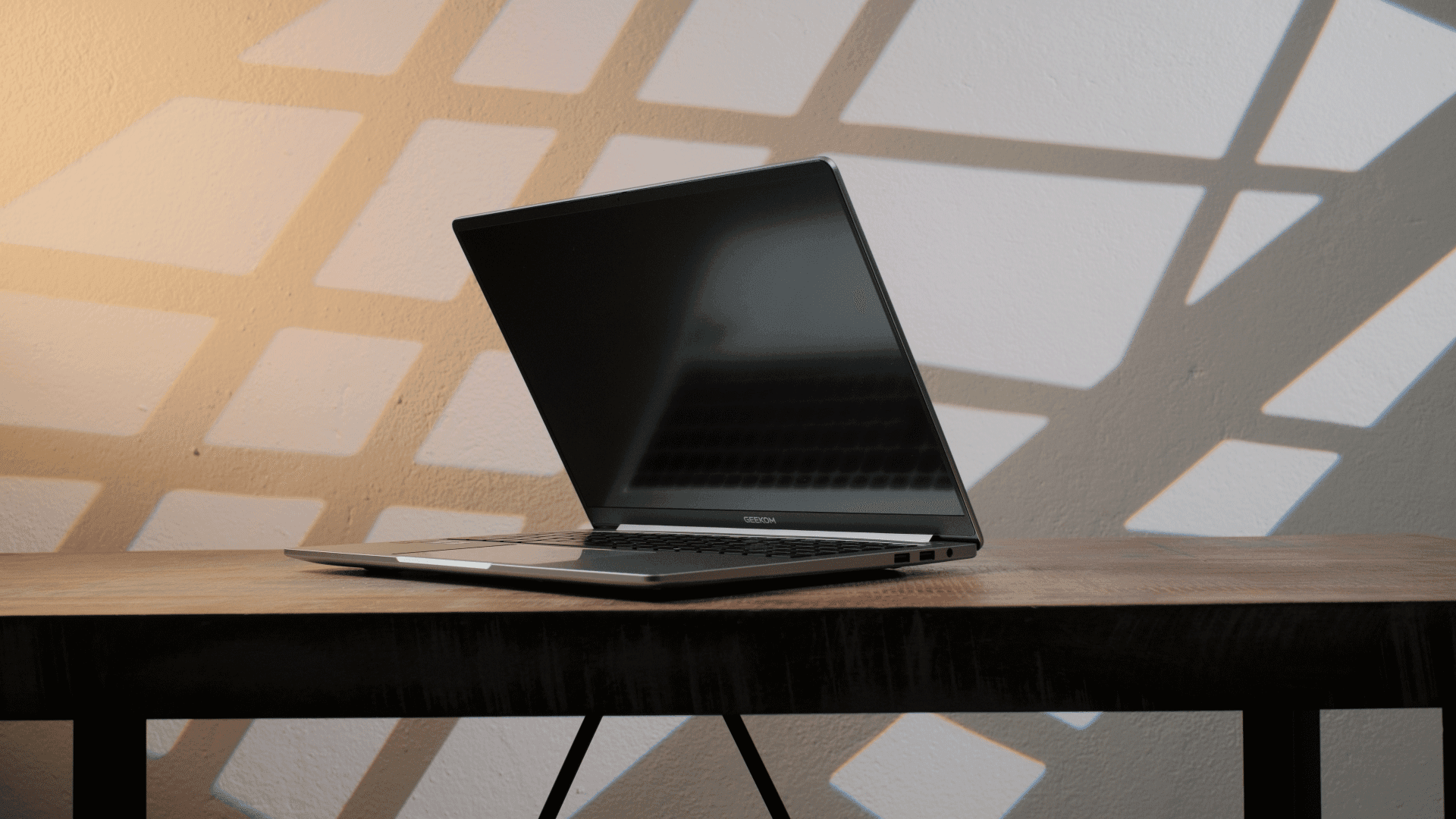
A desktop editing workstation remains the most comfortable solution for demanding post production. However, filmmakers also need a computer that can travel between the studio, filming locations, client offices and home. The GEEKOM GeekBook M16 is designed as a 16 inch Windows laptop for users who need a relatively large workspace without being tied to a permanent desk.
From my perspective as a filmmaker, its most interesting qualities are the large 16:10 display, the Intel Core Ultra 9 processor, expandable SSD storage, broad connectivity and a 99.9 Wh battery. At the same time, its 16 GB memory configuration, integrated graphics and 60 Hz Full HD Plus display mean that it should be viewed as a mobile creative workstation with clear practical limits, rather than a replacement for every professional post production system.
Performance for Editing and Creative Work
The GeekBook M16 is equipped with an Intel Core Ultra 9 185H processor. This mobile processor provides 16 cores, 22 threads and a maximum turbo frequency of 5.1 GHz. It combines performance cores, efficiency cores and low power efficiency cores, allowing the system to distribute demanding and lighter background tasks across different parts of the processor.
For filmmakers, processor performance affects much more than export times. It also influences how smoothly editing software handles media imports, waveform generation, audio processing, proxies, background rendering and applications running alongside the editing program.
GEEKOM states that the laptop can operate at up to 55 watts using its Dynamic Tuning Technology. The manufacturer also uses a dual fan cooling system called IceBlade 3.0 to manage temperatures under sustained workloads. Actual performance will naturally depend on the selected power mode, the software, ambient temperature and whether the laptop is connected to power.
This processor should be useful for everyday editing, content creation and multitasking. It could handle tasks such as editing corporate interviews, assembling social media content, preparing rough cuts and working with proxy media while travelling.
However, the GeekBook M16 uses integrated Intel Arc graphics rather than a separate dedicated graphics card. Integrated graphics can support creative applications and GPU accelerated processing, but filmmakers working with complex visual effects, intensive noise reduction, advanced colour grading, 3D animation or demanding multicamera timelines may benefit from a system with a more powerful dedicated GPU.
Understanding the 16 GB Memory Configuration
The available configuration listed by GEEKOM includes 16 GB of LPDDR5 memory. This can be sufficient for normal office work, photo editing, lighter video projects and editing workflows that use optimised or proxy media.
For filmmakers, however, memory requirements can increase quickly. Editing software, motion graphics programs, web browsers, communication tools and media management applications may all be open simultaneously. High resolution footage, large image sequences and multicamera projects can place additional pressure on the available memory.
I would therefore consider the GeekBook M16 most suitable for controlled mobile workflows. This could include reviewing footage on location, preparing an assembly edit, editing straightforward YouTube videos, organising a project or making client revisions away from the studio.
For effects heavy productions or large professional timelines, 16 GB may become a limitation before the processor reaches its full potential. Using proxy files, closing unnecessary background applications and keeping projects organised would help maintain a smoother editing experience.
A Large 16:10 Workspace
The GeekBook M16 includes a 16 inch IPS display with a resolution of 1920 by 1200, a 16:10 aspect ratio and a refresh rate of 60 Hz. GEEKOM also specifies a screen to body ratio of approximately 90 percent.
The 16:10 format is particularly practical for creative software. Compared with a conventional 16:9 screen, it provides additional vertical workspace. In an editing application, this can leave more room for the preview window, timeline, effects controls and media browser.
The 1920 by 1200 resolution will not display 4K footage at its native resolution, but that is not necessarily a problem for mobile editing. A lower display resolution can reduce the graphical workload and keep interface elements readable without excessive scaling.
One important limitation is that the official specifications do not provide a colour gamut figure such as sRGB, Adobe RGB or DCI P3 coverage. For that reason, I would not automatically treat the internal screen as a reliable reference for colour critical grading without independent measurement and calibration.
It should still be useful for editing, composition checks, rough colour adjustments and client previews. Final grading and mastering decisions should ideally be made on a calibrated external display, especially when accurate colour delivery is important.
Storage for Active Video Projects
The listed GeekBook M16 configuration comes with a 512 GB PCIe 4.0 NVMe SSD. This amount of storage can fill up quickly when working with original camera files, especially when recording in 4K or using high bitrate formats.
The useful part of the design is its storage expansion. GEEKOM lists one M.2 2280 PCIe 4.0 slot that supports drives with capacities of up to 4 TB, together with an additional M.2 2230 PCIe 4.0 slot supporting up to 2 TB.
This allows filmmakers to adapt the internal storage to their workflow. A larger drive could hold active projects, proxy media, music libraries, graphics and editing cache files. The second slot could also be used to separate project media from the operating system and applications.
Even with expanded internal storage, I would continue using external drives and a proper backup strategy. A laptop should not become the only location where original footage exists. For professional productions, camera media should be copied to multiple storage devices before cards are formatted or reused.
Ports for a Filmmaking Setup
Connectivity is one of the more practical areas of the GeekBook M16. The laptop includes one USB4 port with bandwidth of up to 40 Gbps, one fully functional USB C 3.2 Gen 2 port, two USB A 3.2 Gen 1 ports, HDMI 2.0 and a 3.5 mm audio connection. GEEKOM also lists a docking station as part of the package.
USB4 can be particularly useful for filmmakers connecting fast external SSDs, docking equipment or compatible monitors. HDMI allows the laptop to connect directly to many televisions, projectors and external displays without requiring a separate video adapter.
GEEKOM states that the M16 can support three external 4K monitors through USB4, USB C and HDMI, creating a workspace with up to four screens when the internal display is included.
That could be useful in a studio setup where the laptop is connected to a larger editing monitor, a client preview display and an additional screen for project management or communication.
One connection missing from the listed specifications is an integrated SD or microSD card reader. Filmmakers transferring material directly from camera cards would therefore need a separate reader. This is not a major problem, but it is another accessory that needs to be packed for location work.
Battery Life and Mobile Production
The GeekBook M16 contains a 99.9 Wh battery, which is close to the common 100 Wh limit applied to laptop batteries carried in aircraft cabins. GEEKOM advertises battery life of up to 24 hours and includes a 100 watt USB C PD charger.
The large battery is valuable for production work, but the advertised maximum should not be confused with continuous video editing time. Rendering, editing, high display brightness, external drives and wireless transfers consume considerably more energy than lighter office tasks.
In a filmmaking workflow, the battery could still provide useful flexibility. It may allow footage to be reviewed during a journey, scripts to be adjusted on location or a rough edit to continue when a power outlet is unavailable.
USB C charging is also helpful because it reduces dependence on a proprietary power connection. A compatible high output USB C charger could potentially be shared with other production equipment, although the power requirements of every device should be checked first.
Design and Everyday Usability
Despite its 16 inch display, the GeekBook M16 measures approximately 355 by 250 by 16.7 millimetres and weighs around 1.73 kilograms. It uses a CNC machined aluminium body and includes a hinge that can open to 180 degrees.
It is not an ultra compact laptop, but the weight is reasonable for a device with this screen size and battery capacity. For filmmakers who already carry cameras, lenses, audio equipment and lighting accessories, every additional kilogram matters. The M16 should still fit into many larger camera backpacks or production cases without requiring its own dedicated bag.
The full size German QWERTZ keyboard includes a numeric keypad and four levels of white backlighting. The laptop also has a large multitouch trackpad, a fingerprint sensor integrated into the power button and a 1080p webcam with a digital privacy switch.
The numeric keypad may not be essential for editing, but it can be useful when preparing quotations, budgets, shot lists and production calculations. The backlit keyboard is more directly relevant when working in dark studios, backstage environments or dimly lit locations.
Communication and Wireless Connections
The laptop supports Wi Fi 6E and Bluetooth 5.4. These connections can be used for wireless internet access, headphones, input devices and selected production accessories.
Fast wireless connectivity is useful when uploading previews, downloading client assets or accessing cloud based production documents. However, transferring large amounts of original camera footage over Wi Fi may still be less predictable than using a fast wired drive or network connection.
The integrated 1080p webcam and stereo speakers also make the laptop suitable for client calls, remote production meetings and edit reviews. For professional audio monitoring, I would still use wired studio headphones or an external audio interface rather than relying on the built in speakers.
Where the GeekBook M16 Fits into a Filmmaking Workflow
The GeekBook M16 combines a capable mobile processor, integrated Intel Arc graphics, a large battery and a useful selection of ports. Its 16 inch display provides enough room for creative applications, while the expandable SSD storage makes it easier to manage larger active projects.
From my perspective, its most realistic filmmaking applications include:
Reviewing footage after a production
Creating proxy files and organising media
Editing interviews, corporate videos and online content
Preparing rough cuts while travelling
Processing client feedback away from the studio
Writing scripts and planning productions
Connecting to external monitors and storage in a studio
Managing presentations, budgets and production documents
The laptop is less suited to replacing a high end workstation for effects heavy post production, complex 3D work or colour critical mastering. The 16 GB memory configuration, integrated graphics and lack of published colour gamut information should be considered when planning demanding professional workflows.
For mobile editing, project organisation and general content production, however, the GeekBook M16 offers a balanced combination of processing capability, screen space, storage expansion and connectivity. It could serve as a practical bridge between production work on location and a larger editing setup in the studio.
For filmmakers who need to carry an entire working environment between different locations, that flexibility is ultimately the most relevant part of the GeekBook M16.
Amazon: https://www.amazon.de/dp/B0GT4Y6QRJ?maas=maas_adg_7E24B558535119FDBC0B2D8D81441DF7_afap_abs&ref_=aa_maas&tag=maas
DE Official Store: https://www.geekom.de/geekbook-m16-16-zoll-laptop/?mtm_campaign=kolM162026&mtm_kwd=FenchelJanisch
12% OFF Discount Code: GBM16FCJSOFF (valid until July 20, 2026)